Set Up OpenShell on Kubernetes
Deploy the OpenShell gateway to a Kubernetes cluster using the official Helm chart from GHCR.
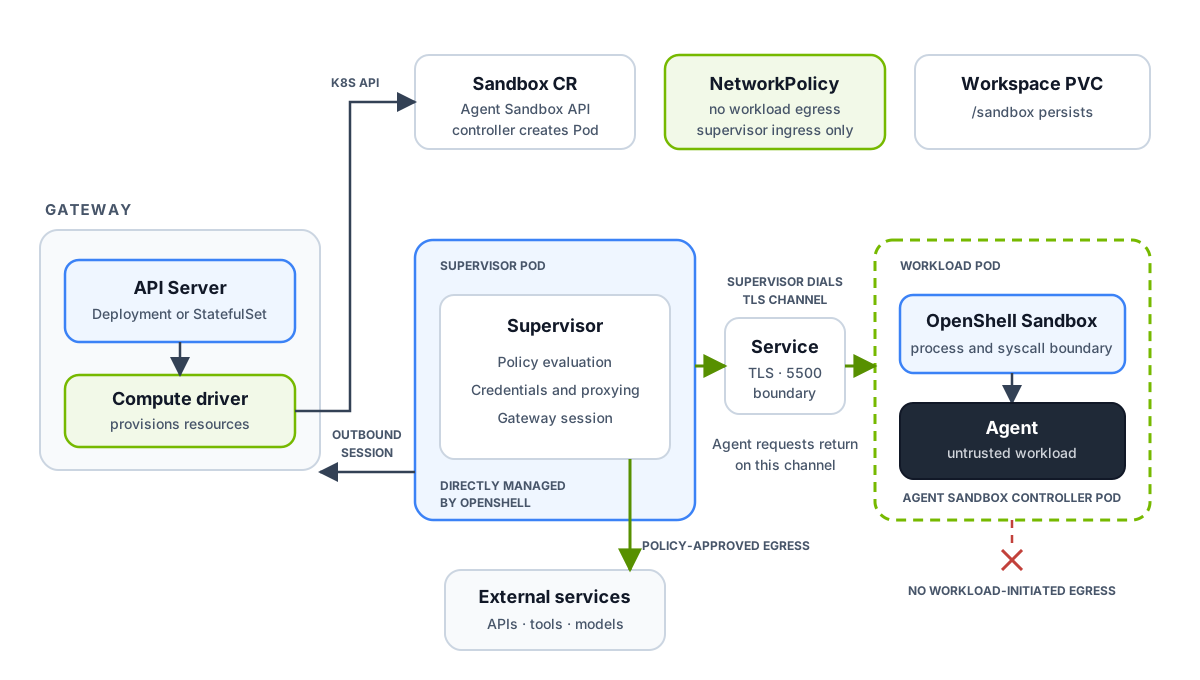
The gateway’s Kubernetes compute driver creates a Sandbox resource and a
separate supervisor Pod. The Agent Sandbox controller creates the workload Pod
from that resource. A Service gives the supervisor a stable address for the
workload’s authenticated TLS boundary, and a PVC preserves /sandbox across
Pod restarts. The gateway can run in the same namespace as these resources or
in a separate namespace.
The supervisor opens the boundary connection and maintains an outbound session
to the gateway. A NetworkPolicy allows only supervisor ingress to the
workload’s boundary port and denies new workload-initiated connections. Agent
network requests return on the established channel; the supervisor evaluates
policy and opens approved upstream connections. For the trust boundaries and
request flow, see Architecture.
Prerequisites
Section titled “Prerequisites”Make sure the following are in place before you install.
| Prerequisite | Required | Notes |
|---|---|---|
| Kubernetes 1.29+ with RBAC enabled | Yes | No additional notes. |
CNI that enforces ingress and egress NetworkPolicy in sandbox namespaces |
Yes | Verify enforcement on your cluster. |
| Helm 3.x | Yes | No additional notes. |
| Agent Sandbox controller and CRDs | Yes | Install before the OpenShell chart. Refer to Install Agent Sandbox. |
| cert-manager | No | Refer to Managing Certificates. Use cert-manager only if you prefer it over the built-in PKI job. |
| Kubernetes Gateway API | No | Refer to Ingress. Use it only for external access without port-forwarding. |
Install Agent Sandbox
Section titled “Install Agent Sandbox”OpenShell uses the Agent Sandbox Kubernetes SIG project to provision sandbox pods. Install the Agent Sandbox controller and its CRDs on your cluster before installing the OpenShell Helm chart.
Apply the latest release manifest:
kubectl apply -f https://github.com/kubernetes-sigs/agent-sandbox/releases/latest/download/sandbox.yamlThis creates the agent-sandbox-system namespace, installs the sandboxes.agents.x-k8s.io CRD, and starts the controller.
The Helm chart checks for a supported Agent Sandbox API before it creates
gateway resources. This preflight is enabled by default. Disable it only for
offline helm template rendering, where Helm cannot discover cluster APIs:
helm template openshell oci://ghcr.io/nvidia/openshell/helm-chart \ --version <version> \ --set agentSandbox.preflight.enabled=falseThe chart does not install or upgrade the cluster-scoped Agent Sandbox CRDs or controller.
Confirm the controller pod is running before proceeding:
kubectl -n agent-sandbox-system get podsThe controller pod should reach Running status within a few seconds. For cluster-specific setup instructions, including KinD and GKE walkthroughs, refer to the Agent Sandbox getting started guide.
Upgrade Agent Sandbox
Section titled “Upgrade Agent Sandbox”OpenShell detects the served Agent Sandbox Sandbox API when the Kubernetes gateway first needs it and caches that choice for the gateway process. If you upgrade Agent Sandbox in place, restart the OpenShell gateway after the Agent Sandbox controller and CRD rollout completes so the gateway can detect the served API versions again. Existing sandboxes keep running during the upgrade, and the restarted gateway can continue managing them.
Install OpenShell
Section titled “Install OpenShell”Create the namespace
Section titled “Create the namespace”kubectl create namespace openshellInstall the chart
Section titled “Install the chart”Install from the OCI registry on GHCR. Replace <version> with the chart version you want to install.
helm upgrade --install openshell \ oci://ghcr.io/nvidia/openshell/helm-chart \ --version <version> \ --namespace openshellTo use the latest development build instead of a stable release:
helm upgrade --install openshell \ oci://ghcr.io/nvidia/openshell/helm-chart \ --version 0.0.0-dev \ --namespace openshellThe chart automatically generates PKI secrets on first install using pre-install Helm hooks. No manual secret creation is required.
To add labels or annotations to both certificate hook Pod templates, use
pkiInitJob.podLabels and pkiInitJob.podAnnotations. Chart-owned Pod labels
take precedence when custom keys conflict.
For example, disable sidecar injection for hook Pods in an Istio-injected
namespace:
pkiInitJob: podAnnotations: sidecar.istio.io/inject: "false"The default Kubernetes driver puts all workspaces in one sandbox namespace. To have the gateway create a namespace for each workspace, follow Workspace on Kubernetes.
Split gateway and workspace releases
Section titled “Split gateway and workspace releases”For a platform-managed namespace, install the gateway without namespace-scoped sandbox resources, then install the workspace chart in the sandbox namespace:
helm upgrade --install openshell \  oci://ghcr.io/nvidia/openshell/helm-chart \  --version <version> \  --namespace openshell \  --set workspaceResources.enabled=false \  --set server.sandboxNamespace=app-a
helm upgrade --install openshell-workspace \  oci://ghcr.io/nvidia/openshell/openshell-workspace \  --version <version> \  --namespace app-a \  --set gateway.serviceAccount.name=openshell \  --set gateway.serviceAccount.namespace=openshell
The workspace chart does not create the namespace or deploy a gateway. It owns
only the sandbox ServiceAccount, Role, RoleBinding, and NetworkPolicy in its
release namespace. For one pre-provisioned namespace, keep
server.drivers.kubernetes.workspaceMode=shared and set
server.sandboxNamespace=app-a. To map multiple workspaces to separately
provisioned namespaces, use workspaceMode=operator, configure exactly one of
operatorNamespaceLabel or operatorNamespaceFile, and install the workspace
chart in every allowlisted namespace. In operator mode, the workspace chart
Role is the gateway’s only Secret permission grant in that namespace.
If you enable server.drivers.kubernetes.allowDriverConfig on the gateway,
also set gateway.allowDriverConfig=true on every workspace release. This
grants the namespace-scoped PVC metadata read needed to admit caller-selected
PVC mounts. Leave both values disabled when callers do not need driver config.
Store provider credentials in Kubernetes Secrets
Section titled “Store provider credentials in Kubernetes Secrets”To store provider credentials as Kubernetes Secrets instead of in the gateway database, enable the Kubernetes Secrets credential driver with a dedicated namespace:
helm upgrade --install openshell \ oci://ghcr.io/nvidia/openshell/helm-chart \ --version <version> \ --namespace openshell \ --set server.credentialDrivers.kubernetesSecrets.enabled=true \ --set server.credentialDrivers.kubernetesSecrets.namespace=openshell-credentials \ --set server.credentialDrivers.kubernetesSecrets.createNamespace=trueThe driver stores every credential in that namespace, in every workspace mode. The gateway receives Secret permissions through a Role in that namespace only. For the full set of options, refer to the gateway configuration reference.
Wait for the gateway to be ready
Section titled “Wait for the gateway to be ready”kubectl -n openshell rollout status statefulset/openshellIf you set workload.kind=deployment, wait on the Deployment instead:
kubectl -n openshell rollout status deployment/openshellConnect to the gateway
Section titled “Connect to the gateway”For local evaluation, use a port-forward:
kubectl -n openshell port-forward svc/openshell 8080:8080Install the TLS client bundle
Section titled “Install the TLS client bundle”The chart generates an mTLS bundle for transport security. Kubernetes deployments do not use that bundle as user authentication; configure OIDC or a trusted access proxy as described in Access Control. For local port-forwarded access, copy the generated bundle so the CLI can verify the gateway certificate:
mkdir -p ~/.config/openshell/gateways/k8s/mtlskubectl -n openshell get secret openshell-client-tls \ -o jsonpath='{.data.ca\.crt}' | base64 -d > ~/.config/openshell/gateways/k8s/mtls/ca.crtkubectl -n openshell get secret openshell-client-tls \ -o jsonpath='{.data.tls\.crt}' | base64 -d > ~/.config/openshell/gateways/k8s/mtls/tls.crtkubectl -n openshell get secret openshell-client-tls \ -o jsonpath='{.data.tls\.key}' | base64 -d > ~/.config/openshell/gateways/k8s/mtls/tls.keyThe server certificate SANs include localhost and 127.0.0.1, so hostname verification passes over the port-forward without extra flags.
Register with the CLI
Section titled “Register with the CLI”In another terminal, register the gateway with the user authentication mode you configured and verify it is reachable. For example, with OIDC:
openshell gateway add https://127.0.0.1:8080 --local --name k8s \ --oidc-issuer https://your-idp.example.com/realms/openshell \ --oidc-client-id openshell-cliopenshell statusUpgrade OpenShell
Section titled “Upgrade OpenShell”To upgrade, rerun helm upgrade --install with the new --version and the values you installed with. Running sandboxes keep their supervisor and sandbox runtime images until they stop. When a stopped sandbox starts, it takes both images from the upgraded gateway and keeps its workload image and workspace.
If you override images, set supervisor.image and sandboxRuntime.image to the same release, or set only global.image.tag. An incompatible pair fails when a sandbox starts, and the supervisor log shows the cause while the start is in progress:
kubectl -n openshell logs -l openshell.ai/sandbox-id=<sandbox-id>,openshell.ai/component=supervisorAfter you correct the images, recover a sandbox whose start timed out as described in Sandbox Lifecycle.
Configure Chart Values
Section titled “Configure Chart Values”The Helm chart renders gatewayConfig into the mounted gateway.toml
ConfigMap. Each top-level key names a TOML table, and its fields use the names
in the gateway configuration reference.
For example, set the gateway log level with:
helm upgrade openshell \ oci://ghcr.io/nvidia/openshell/helm-chart \ --version <version> \ --namespace openshell \ --set 'gatewayConfig.openshell\.gateway.log_level=debug'Keep credentials, database URLs, and private keys in Kubernetes Secrets,
using the chart’s environment-variable, file, or volume wiring. The chart
rejects database_url, inline URL credentials, and PEM private keys in
gatewayConfig, but it does not detect every possible secret.
Helm values for Services, probes, TLS certificates, Secret references, RBAC, NetworkPolicies, and mounts still control those Kubernetes resources. The chart derives their corresponding runtime settings to keep the gateway configuration aligned with the deployed resources.
YAML scalar values retain their types, scalar lists become TOML arrays, and nested maps become inline tables. Top-level lists become arrays of tables and preserve item order. Null fields are omitted; null array elements are invalid. Helm template expressions in strings are not evaluated.
Existing application values remain supported as deprecated aliases. Explicit
gatewayConfig fields take precedence, including resource-admission settings
and the Kubernetes Secrets credential namespace. The global image pull policy
applies to runtime and supervisor images. Leave image_pull_policy and
sandbox.image.pullPolicy unset to use Kubernetes defaults for the workload
image.
The most commonly changed values are:
| Value | Purpose |
|---|---|
global.image.registry / global.image.tag / global.image.pullPolicy |
Shared registry, tag, and pull policy for the gateway, supervisor, and trusted sandbox runtime. Individual image settings take precedence. |
gateway.image.registry / gateway.image.repository / gateway.image.tag / gateway.image.digest |
Gateway container image. Defaults to ghcr.io/nvidia/openshell/gateway:latest. |
replicaCount |
Number of gateway replicas. Values above 1 require shared PostgreSQL through server.externalDbSecret. |
priorityClassName |
Existing Kubernetes PriorityClass for gateway pods. Empty by default. |
topologySpreadConstraints |
Kubernetes topology spread constraints for gateway replicas. Empty by default. Set selectors to match the gateway pod labels. |
workload.kind |
Gateway workload controller. Use statefulset for SQLite or deployment with server.externalDbSecret. |
workload.allowMultiReplicaStatefulSet |
Allow replicaCount > 1 with workload.kind=statefulset. Prefer Deployment for external database-backed multi-replica gateways. |
autoscaling.enabled / autoscaling.minReplicas / autoscaling.maxReplicas |
Render a HorizontalPodAutoscaler instead of a fixed replicaCount. Refer to High Availability. |
server.sandboxNamespace |
Namespace where sandbox pods are created. Defaults to the Helm release namespace when left empty. |
workspaceResources.enabled |
Create namespace-scoped sandbox prerequisites from the gateway chart. Disable when installing the workspace chart separately. |
server.externalDbSecret |
Secret containing a PostgreSQL connection URI in the uri key. Use when the database is managed outside the chart. |
server.dataStorageSize |
Storage request for the gateway data PVC under workload.kind=statefulset. Defaults to 1Gi. Requires an explicit unit, such as 20Gi. |
server.dataStorageClass |
StorageClass for the gateway data PVC under workload.kind=statefulset. Empty (default) omits storageClassName and uses the cluster’s default StorageClass. Use a block-backed class, not NFS. |
server.telemetryEnabled |
Enable anonymous OpenShell telemetry from the gateway and its sandbox supervisors. Set to false to opt out. |
sandbox.image.repository / sandbox.image.tag / sandbox.image.digest |
Default sandbox image used when a sandbox does not specify one. |
sandboxRuntime.image.registry / sandboxRuntime.image.repository / sandboxRuntime.image.tag / sandboxRuntime.image.digest |
Trusted workload-side image that provides the openshell-sandbox binary. A digest takes precedence over the tag. |
supervisor.image.registry / supervisor.image.repository / supervisor.image.tag / supervisor.image.digest |
Trusted control-side supervisor image. |
server.sandboxImagePullSecrets |
Image pull secrets attached to sandbox pods. Referenced Secrets must exist in the sandbox namespace. |
server.grpcEndpoint |
Endpoint that sandbox supervisors use to call back to the gateway. Must be reachable from inside the cluster. |
server.disableTls |
Run the gateway over plaintext HTTP. Use only behind a trusted transport. |
server.auth.allowUnauthenticatedUsers |
Accept user-facing calls without OIDC or mTLS credentials. Use only for trusted local development or a fully trusted access proxy. |
server.enableLoopbackServiceHttp |
Enable local plaintext HTTP for loopback sandbox service URLs. Defaults to true. |
server.serviceHostnameFormat |
Set to hashed to make exposed-service hostnames opaque per-gateway hash labels when multiple gateways share one service base domain behind a single ingress; the hash discriminator is the gateway installation name (server.name, defaulting to the release name), which must be unique among those gateways. Empty keeps the readable composite hostnames. Refer to Ingress. |
pkiInitJob.serverDnsNames / certManager.serverDnsNames |
Additional gateway server DNS SANs. Wildcard SANs also enable sandbox service URLs under that domain. |
supervisor.sandboxRuntime.boundaryPort |
Non-privileged TLS port used between paired supervisor and sandbox Pods. |
upstreamProxy |
Operator-owned corporate HTTP forward proxy for policy-approved TLS egress. Refer to Configure a Corporate Upstream Proxy. |
Use a values file for repeatable deployments:
helm upgrade --install openshell \ oci://ghcr.io/nvidia/openshell/helm-chart \ --version <version> \ --namespace openshell \ --values my-values.yamlTo use private sandbox images, create a kubernetes.io/dockerconfigjson Secret
in the sandbox namespace and reference its name:
kubectl -n openshell create secret docker-registry regcred \ --docker-server=registry.example.com \ --docker-username="$REGISTRY_USER" \ --docker-password="$REGISTRY_TOKEN"server: sandboxImage: registry.example.com/team/openshell-sandbox:latest sandboxImagePullSecrets: - name: regcredConfigure a Corporate Upstream Proxy
Section titled “Configure a Corporate Upstream Proxy”Configure a corporate forward proxy when sandbox TLS egress cannot dial the Internet directly. OpenShell evaluates policy and SSRF checks before it opens an HTTP CONNECT tunnel through the proxy. The proxy URL is operator-owned configuration. Sandbox environment variables cannot select, replace, or bypass it.
Create the credential Secret in the sandbox namespace when the proxy requires Basic authentication. The Secret value uses the user:pass form.
kubectl -n openshell create secret generic corporate-proxy-auth \ --from-literal=credentials="$PROXY_USER:$PROXY_PASSWORD"Add the proxy settings to your Helm values file. Replace the DNS suffixes and CIDRs in noProxy with values for your cluster. noProxy bypasses only the corporate proxy. OpenShell policy evaluation still applies.
upstreamProxy: url: http://proxy.corp.example:8080 noProxy: .svc,.svc.cluster.local,10.96.0.0/12,10.244.0.0/16 authSecret: name: corporate-proxy-auth key: credentials authAllowInsecure: trueUse authAllowInsecure: true only when you accept that Basic authentication is cleartext on the connection to an http:// proxy. The initial release supports http:// proxy endpoints and TLS CONNECT egress. It does not support HTTPS-to-proxy, custom corporate CA bundles, or forwarding plain HTTP egress through the proxy.
The credential mounts only in the separately scheduled supervisor Pod. The sandbox workload cannot read it through its environment or volumes.
The chart creates the following RBAC resources in the release namespace:
| Resource | Scope | Name |
|---|---|---|
| ServiceAccount | Namespace | openshell |
| ServiceAccount | Namespace | openshell-sandbox (for sandbox pods) |
| Role + RoleBinding | Namespace | openshell-sandbox |
| ClusterRole + ClusterRoleBinding | Cluster | openshell-node-reader-<release namespace> |
Every other object the chart creates is namespaced. The ClusterRole and
ClusterRoleBinding in the last row are the only cluster-scoped objects.
When the Kubernetes Secrets credential driver is enabled, the chart also creates
an openshell-credential-secrets Role and RoleBinding in the credential
namespace. That Role grants get, create, patch, and delete on all Secrets
in the credential namespace, and is the gateway’s only permission grant for provider
credential Secrets.
In managed and operator workspace modes, the chart creates an
openshell-workspace-secret-source Role and RoleBinding in the sandbox
namespace. That Role grants get on only the gateway client TLS Secret and, in
managed mode, the configured image-pull Secrets. The gateway stages their
contents into each sandbox runtime generation’s Secrets in the workspace
namespace.
The namespaced Role covers sandbox lifecycle, supervisor resources, and identity.
Both the gateway chart and separate workspace chart grant these permissions.
Stopped-sandbox updates use direct Pod get requests to check known workload and
supervisor Pod names for remaining Pods.
| API Group | Resource | Verbs |
|---|---|---|
agents.x-k8s.io |
sandboxes, sandboxes/status |
create, delete, get, list, patch, update, watch |
"" |
events |
get, list, watch |
"" |
pods |
create, delete, get, list, patch, watch |
"" |
services |
create, get |
"" |
secrets |
create, delete |
networking.k8s.io |
networkpolicies |
create, get |
The ClusterRole grants node inspection and token validation:
| API Group | Resource | Verbs |
|---|---|---|
authentication.k8s.io |
tokenreviews |
create |
"" |
nodes |
get, list, watch |
To use an existing ServiceAccount instead of creating one, set serviceAccount.create=false and supply its name:
helm upgrade --install openshell \ oci://ghcr.io/nvidia/openshell/helm-chart \ --version <version> \ --namespace openshell \ --set serviceAccount.create=false \ --set serviceAccount.name=my-existing-saThe ServiceAccount must already have the Role and ClusterRole bindings described above.
Installing without cluster-admin
Section titled “Installing without cluster-admin”By default the release creates the ClusterRole and ClusterRoleBinding, so
the installer needs cluster-scoped permissions. When cluster-scoped RBAC is
owned by a different team, or the installer is a namespace-admin GitOps
controller, split the install into a cluster-admin step and a namespace-admin
step.
A cluster-admin applies the cluster-scoped objects once per gateway ServiceAccount. Render them from the same values the release uses, so the rules match the configured workspace mode and credential driver:
helm template openshell \ oci://ghcr.io/nvidia/openshell/helm-chart \ --version <version> \ --namespace openshell \ -f my-values.yaml \ --set rbac.create=true \ --set rbac.clusterScoped.create=true \ --set agentSandbox.preflight.enabled=false \ --show-only templates/clusterrole.yaml \ --show-only templates/clusterrolebinding.yaml | kubectl apply -f -A namespace-admin then installs and upgrades the chart with cluster-scoped
objects omitted. The release renders only namespaced objects and needs no
permission on clusterroles or clusterrolebindings:
helm upgrade --install openshell \ oci://ghcr.io/nvidia/openshell/helm-chart \ --version <version> \ --namespace openshell \ -f my-values.yaml \ --set rbac.clusterScoped.create=falseThe gateway ServiceAccount name and namespace are unchanged by this flag, so
the pre-created ClusterRoleBinding still binds the ServiceAccount the
namespaced release creates. The same holds with serviceAccount.create=false:
the binding subject follows serviceAccount.name, so pass the same values to
both steps.
Migrating an existing release
Section titled “Migrating an existing release”Helm deletes objects that leave a release manifest, so setting
rbac.clusterScoped.create=false on a release that already owns the
ClusterRole and ClusterRoleBinding deletes them. The gateway then loses
TokenReview until a cluster-admin re-applies them. Hand ownership over first, as
cluster-admin, so nothing is deleted:
kubectl annotate clusterrole "openshell-node-reader-<namespace>" \ helm.sh/resource-policy=keep --overwritekubectl annotate clusterrolebinding "openshell-node-reader-<namespace>" \ helm.sh/resource-policy=keep --overwriteThe objects then survive the upgrade that sets the flag, and the cluster-admin owns them from that point on. Fresh installs need no such step.
rbac.clusterScoped.create is independent of the workspace mode. managed and
operator modes change what the ClusterRole grants, but they never require a
namespace-admin to apply it. Re-run the cluster-admin step after changing any
value that affects the ClusterRole rules.
Set rbac.clusterScoped.clusterRoleName and
rbac.clusterScoped.clusterRoleBindingName when the cluster-admin owns the
naming.
Which flag the installer needs
Section titled “Which flag the installer needs”In the default shared workspace mode the release also creates a namespaced
sandbox Role granting Agent Sandbox (agents.x-k8s.io) permissions.
Kubernetes forbids granting permissions you do not hold, and the built-in
admin ClusterRole does not cover that CRD, so an installer holding only
admin cannot create it. rbac.clusterScoped.create=false alone is then not
enough, and the install fails with attempting to grant RBAC permissions not currently held.
| Workspace mode | Installer holds | Use |
|---|---|---|
shared |
built-in admin only |
rbac.create=false, cluster-admin pre-creates all gateway RBAC |
shared |
admin plus the sandbox permissions in the namespace |
rbac.clusterScoped.create=false |
managed, operator |
built-in admin only |
rbac.clusterScoped.create=false |
managed and operator render no namespaced sandbox Role, so no extra grant
is needed there.
With rbac.create=false, the cluster-admin applies the namespaced RBAC in the
same step by adding it to the render:
helm template openshell \ oci://ghcr.io/nvidia/openshell/helm-chart \ --version <version> \ --namespace openshell \ -f my-values.yaml \ --set rbac.create=true \ --set rbac.clusterScoped.create=true \ --set agentSandbox.preflight.enabled=false \ --show-only templates/clusterrole.yaml \ --show-only templates/clusterrolebinding.yaml \ --show-only templates/role.yaml \ --show-only templates/rolebinding.yaml \ --show-only templates/peer-role.yaml | kubectl apply -f -To grant the installer the sandbox permissions instead, bind it to a Role
carrying the same rules as the chart’s openshell-sandbox Role.
Pod Security
Section titled “Pod Security”The gateway workload and the PKI bootstrap hooks satisfy the Restricted Pod Security Standard, so the release installs into a namespace labeled pod-security.kubernetes.io/enforce=restricted.
Probes
Section titled “Probes”The gateway exposes /healthz for process liveness and /readyz for dependency-aware readiness on the health port. The Helm chart wires both into Kubernetes probes:
startupProbeandlivenessProbeuse/healthz.readinessProbeuses/readyz, which reflects the latest result of an in-process background database check.
A gateway that starts while its database is unreachable keeps retrying the connection. Meanwhile /healthz succeeds and /readyz reports not ready, so Kubernetes keeps the pod without routing traffic to it.
Each sandbox supervisor Pod uses a tcpSocket readiness probe on port 5501. The supervisor accepts connections on that port only while its gateway session is ready. If you add a default-deny ingress policy to sandbox namespaces, allow TCP port 5501 from the node so kubelet can reach supervisor Pods.
Next Steps
Section titled “Next Steps”- To run multiple gateway replicas, refer to High Availability.
- To enable automatic certificate rotation with cert-manager, refer to Managing Certificates.
- To expose the gateway externally without port-forwarding, refer to Ingress.
- To configure OIDC or reverse-proxy authentication, refer to Access Control.
- To create your first sandbox, refer to Manage Sandboxes.
We are a Cloud Native Computing Foundation sandbox project.


Copyright OpenShell a Series of LF Projects, LLC
For website terms of use, trademark policy and other project policies please see lfprojects.org/policies/.